Do you need a job application tracker? What to track and what to ignore
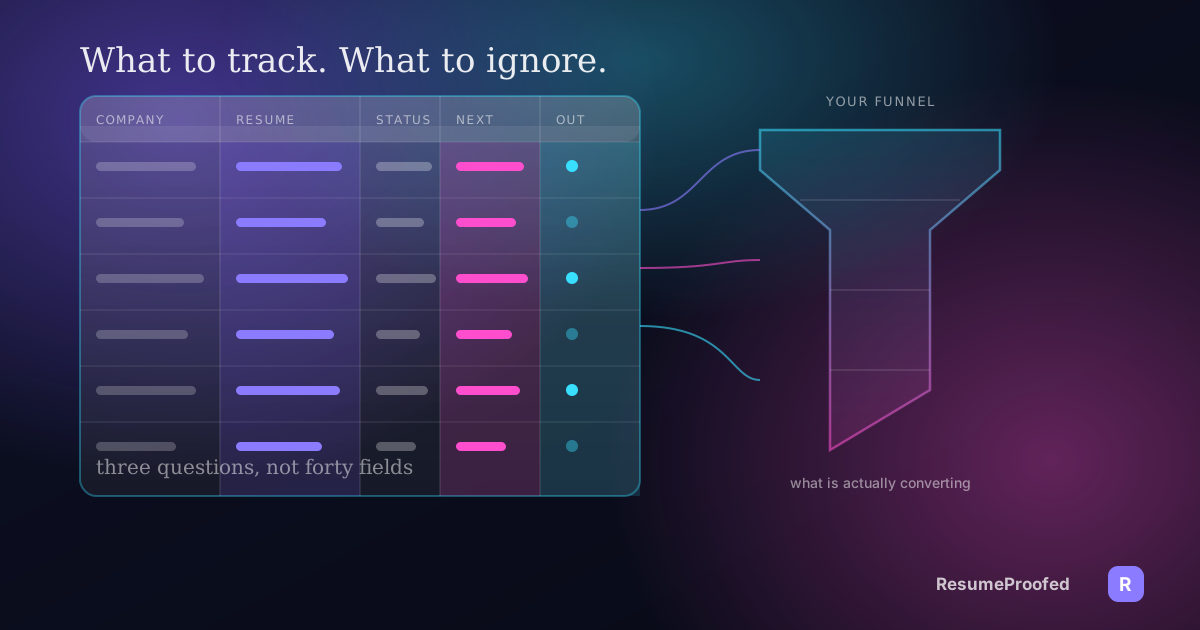
A tracker only earns its keep if it answers three questions: which resume version, when to follow up, and what is actually converting.
- Job search
- Job search tools
- Career management
Twenty three days ago you applied to a company you actually liked, and a recruiter just emailed asking to schedule a call. You cannot remember which version of your resume you sent them, whether you already followed up once, or what you said in the cover letter. That is not a memory problem. It is a tracking problem, and it is the specific problem this article is about.

Here is the position worth stating early: a job application tracker is not about tidiness. Colour coded rows and a satisfying kanban board feel productive, but they are not why tracking matters. Tracking matters because, without it, you cannot answer three questions a serious job search eventually forces on you: which version of your resume went to this company, when should you follow up and on what, and which of your approaches is actually converting into interviews. A notebook, a folder of emails, or your own memory cannot answer any of the three reliably past about a dozen applications. A tracker, even a basic one, can.
The three questions a tracker actually has to answer
Everything else is decoration. If your system, spreadsheet or app, cannot answer these three questions in under thirty seconds, it is not doing its job.
Which version of my resume did this company get? If you tailor your resume per role, and you should, you will eventually have several live versions in flight at once: one leaning technical, one leaning leadership, one for a slightly different job title. When a recruiter calls, you need to know in seconds what they are holding, so your interview answers do not contradict what is on the page. What a master resume actually is explains the underlying document this problem starts from, and how to tailor a resume to a job description covers the method for producing each version without rewriting from scratch.
When should I follow up, and have I already? Following up too early reads as impatient, following up never reads as indifferent, and following up twice because you forgot you already did it reads as disorganised. Without a recorded date, you are guessing every time.
Which of my approaches is actually converting? This is the question most trackers quietly fail to answer, because it needs more than a status column. It needs enough structure to compare resume versions, sources, and job types against each other after a month of data, not just a list of where you have applied.
The minimum viable field set
A tracker earns its place with a fairly short list of fields. Anything beyond this is optional, and most of it is the busywork covered in the next section.
| Column | What goes in it | Why it matters |
|---|---|---|
| Company | Employer name | The obvious anchor for everything else |
| Role and level | Job title exactly as posted | Titles vary a lot for near identical roles, so the posted wording matters |
| Date applied | The date you submitted | Anchors your follow up timing |
| Source | Job board, referral, direct, recruiter | Lets you compare which channel actually converts |
| Resume version | A short label, for example v3-pm-fintech | Answers question one instantly |
| Job ad saved | A link or a pasted copy of the ad text | Postings get taken down; you will need the original wording again for an interview |
| Status | Applied, screening, interview, offer, rejected, ghosted | The current stage, updated as it changes |
| Last contact date | The date of the most recent reply, call, or email either direction | Anchors question two |
| Next action date | When you plan to follow up or expect to hear back | The single most useful column in the whole sheet |
| Contact name | The recruiter or hiring manager, if you have one | Makes a follow up personal instead of generic |
| Outcome | Interview yes or no, at minimum | The raw material for the monthly review below |
That is eleven columns. You can build all of them in ten minutes, which is covered further down. Every one of them earns its place because it feeds one of the three questions above, either directly or by feeding the monthly review that answers question three.
What people track that is pure busywork
Job search advice online tends to reward elaborate systems, because an elaborate system looks like effort. Most of the following is effort spent on the wrong thing.
A field for every company research note. Culture pages, Glassdoor scores, mission statements: interesting, but they belong in a separate notes document you open before an interview, not in a row of your tracker that you scan every day. Cramming them into the sheet makes it slower to read at a glance, which is the one thing a tracker has to stay.
Colour coding by industry, mood, or excitement level. A five point excitement rating feels informative and answers nothing you will act on later. If a role stops being worth pursuing, change the status to rejected or withdrawn and move on.
Logging jobs you glanced at but did not apply to. That is a wishlist, not an application tracker, and mixing the two makes your actual conversion numbers wrong when you calculate them later.
A separate row for every recruiter touchpoint. One "last contact date" field, kept current, does the job that a full communication log tries to do with ten times the typing.
Tracking the ATS platform each company uses. Mildly interesting trivia. It has never once changed what a job seeker actually does next.
An elaborate scoring formula for "fit." If you are unsure whether a role is a fit, that is a five minute decision to make once at the top of the funnel, not a weighted score recalculated every time you open the sheet.
The pattern across all of it: busywork fields describe how you feel about a job. Useful fields describe what you did and when you did it. Keep the second kind.
Build it in ten minutes

Open a blank spreadsheet, Google Sheets or Excel both work fine, and do this:
- Row one, the eleven headers above. Type them across, freeze the row so it stays visible while you scroll.
- Turn on filters. One click in Sheets (Data, Create a filter) or Excel (Data, Filter). This alone gives you most of what a paid tracker's kanban view offers, because you can filter Status to "interview" and see only what is live right now.
- Add conditional formatting on Status. Colour applied grey, interview blue, offer green, rejected or ghosted light red. Now the sheet is scannable in two seconds without reading a word.
- Add a formula to the next action column. Something as simple as flagging any next action date that has passed, using conditional formatting on that column too, so a skipped follow up cannot hide.
- Save it somewhere you will actually open daily. A desktop bookmark or a pinned tab beats a file buried three folders deep in Documents.
Ten minutes, and it already answers all three questions from the top of this article. No account to create, no data sitting on a third party's server, and it exports to literally anything if you switch tools later.
When a dedicated tool earns its price over a sheet
A spreadsheet does the job for most people, and recommending one over a paid product where a paid product is not actually needed is the honest position here, not a sales pitch for the cheaper option. But there are real reasons a dedicated tracker earns its subscription.
Teal is worth naming first because its free tracker is genuinely one of the best in the category: unlimited job tracking with a kanban board and a Chrome extension that saves listings as you browse, no card required. We have covered Teal against Jobscan in full detail elsewhere, including current pricing, so see Teal vs Jobscan for the fuller breakdown rather than repeating it here. If you already know you want a free kanban tracker with a browser extension, it is a strong default.
Huntr takes a similar free-tracker approach: as of August 2026, its free plan tracks up to 100 jobs with a Chrome job clipper, basic resume matching, and two AI-tailored resumes, according to Huntr's own pricing page. Its paid Pro plan runs $40 a month, or $30 a month billed quarterly, or $26.66 a month billed twice yearly, and adds unlimited AI resume generations, unlimited AI cover letters, and unlimited job tracking past the 100 job cap. Confirm current figures on Huntr's own pricing page before subscribing, since these numbers move.
Simplify works differently: it is primarily a Chrome autofill extension that also tracks where you have applied, and it does not publish a pricing page as of August 2026, both /pricing and /simplify-plus return a 404 on its own site. Third party reviews checked the same month put its paid tier, called Simplify+, at roughly $39.99 a month, $19.99 a week, or $89.99 billed every three months, on top of a free tier that includes autofill and tracking indefinitely. Treat the paid figure as approximate until you see it inside the product yourself.
Notion templates sit at the free end of the spectrum. Notion's own marketplace hosts several free, official job tracker templates, including the Job Application Tracker, which is a genuine alternative to a spreadsheet if you already live in Notion for other things. It gives you the same core columns as the spec above with more flexible views, at no cost.
The pattern across all four: a paid tool earns its money when you actually use its extra feature, autofill across job boards, AI drafted bullets, or unlimited tracking past a free cap, not for the tracker function alone, which a spreadsheet does at zero cost and with no account required. If you are applying to more than a hundred roles in a search, or you are tired of retyping the same contact details into every application form, the autofill in Huntr or Simplify is the actual reason to pay, not the tracking grid sitting next to it.
Follow-up timing that is assertive without being annoying
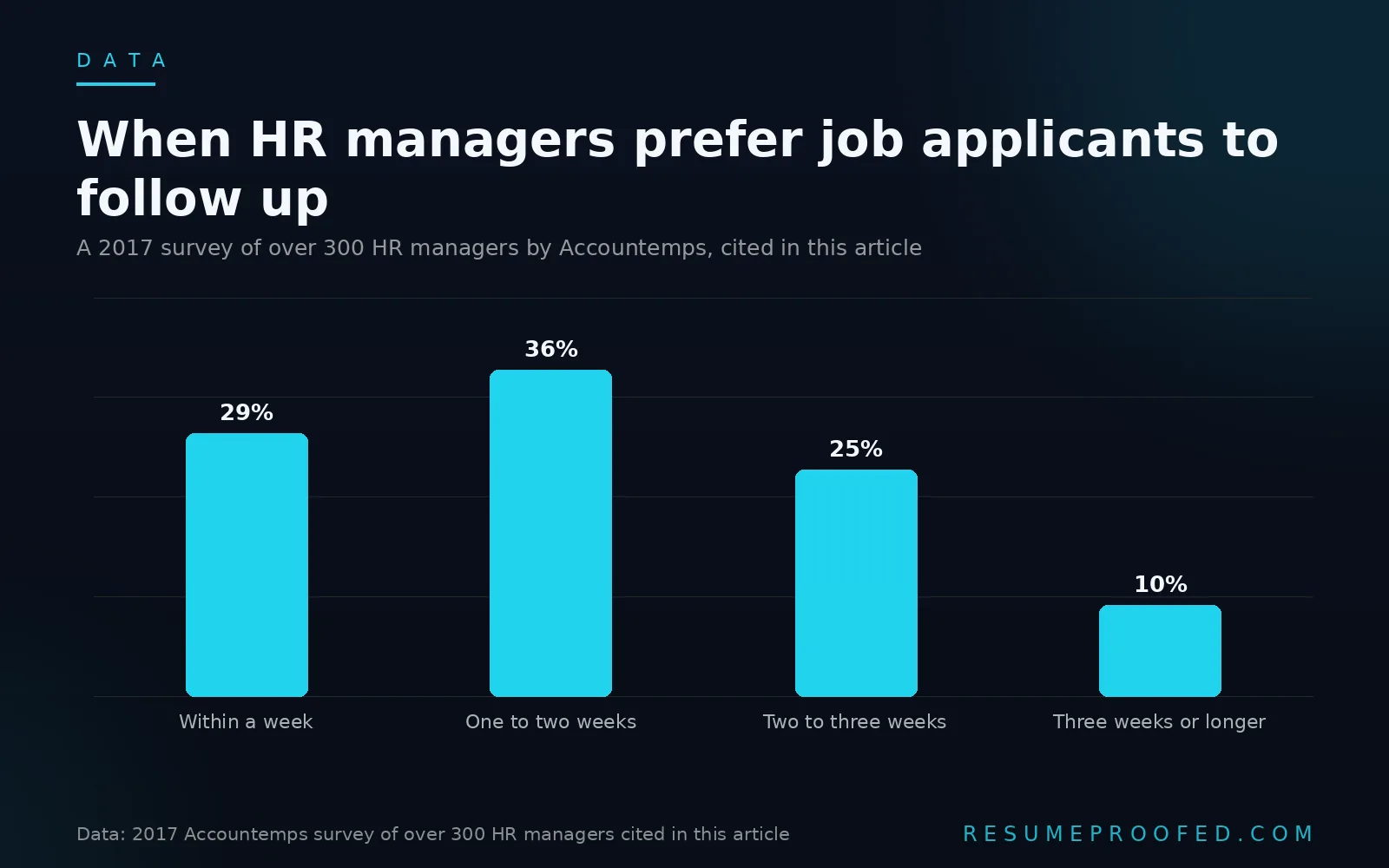
The research on this is older than most people expect but still holds up: a 2017 survey of more than 300 HR managers conducted by Accountemps, a Robert Half staffing division, found that every one of them encouraged applicants to check in on a submitted application. Preferred timing split fairly evenly: 29 percent said within a week, 36 percent said one to two weeks, 25 percent said two to three weeks, and 10 percent said three weeks or longer. The preferred method was clear: 64 percent wanted email, 21 percent phone, 14 percent in person. There is no more recent large scale study we could verify, so treat the shape of these numbers as directional rather than exact, but the direction, that most hiring managers welcome a follow up rather than resent it, has not had a credible study contradict it since.
A practical cadence that respects both the data and the reader's dignity:
- Day 7 to 10: a short, specific email. Reference the role, restate one concrete reason you are a fit, and ask a direct question such as whether the position is still open. Keep it under a hundred words.
- If you get a real response, screening call, interview, or a specific "still reviewing" reply, stop the clock and follow their timeline from there.
- If you hear nothing after the first follow up, wait a further two weeks before a second and final check in. Keep it shorter than the first.
- After a second silence, stop. A third unprompted follow up on a cold application reads as pressure, not interest, and it is past the point any of the survey data above supports.
This is exactly what the next action date column in your tracker exists for. Set it the day you apply, seven to ten days out, and let the sheet do the remembering instead of your memory.
Running a monthly review of your own funnel

This is the step that turns a list into the thing that actually improves your results, and it is the part a plain list of applications, kept in your head or in email, cannot do at all.
Once a month, filter your tracker to the last thirty days and calculate three numbers:
- Response rate. Applications that got any reply, including a rejection, divided by total applications sent.
- Interview rate. Applications that reached an actual interview divided by total applications sent.
- Interview rate by resume version and by source. The same calculation, split by your resume version column and separately by your source column.
The value is entirely in the third number, because it is the only one that tells you what to change. If your fintech-leaning resume version is converting at twice the rate of your generalist version, that is not a guess anymore, it is a pattern from your own data, and it tells you which version to lead with next month. If applications through a referral are converting at several times the rate of cold job board applications, as broader industry data consistently shows referrals do, that is a reason to spend more of next month's time on networking and less on cold submissions.
A useful sanity check on volume comes from Huntr's own Q1 2026 research report, which analysed 139,927 applications from 25,635 job seekers between January and March 2026. It found that users submitting 11 to 20 applications converted to interviews at 9.25 percent per application, while users submitting 100 or more converted at just 2.58 percent, and that two thirds of successful searches ended within 50 total applications. The lesson is not that fewer applications magically work better on their own. It is that the job seekers in that data set who sent fewer, better targeted applications were the same ones tracking closely enough to know which ones were worth repeating, which is exactly the discipline a monthly review builds.
Common questions
Do I really need a job application tracker, or is a spreadsheet enough?
A spreadsheet is enough for almost everyone, provided it has the eleven fields covered above and you actually update it. A dedicated tool earns its price when you want features a sheet cannot do on its own, browser autofill across job sites or unlimited AI resume drafts, not for the tracking function alone.
What should I track for each job application?
At minimum: company, exact role title, date applied, source, which resume version you sent, a saved copy of the job ad, current status, last contact date, next action date, a contact name if you have one, and the eventual outcome. Anything past that list is usually optional detail, not a tracking essential.
How soon should I follow up after applying for a job?
Seven to ten days after applying is a reasonable default, based on hiring manager survey data showing most prefer a follow up within one to two weeks. If you have had no response after a first follow up, one further check in two weeks later is reasonable; a third unprompted follow up on a cold application is generally past the point the data supports.
Is Notion or a spreadsheet better for tracking job applications?
Both work, and the choice comes down to where you already spend time. Notion's free templates give more flexible views of the same underlying data; a spreadsheet is faster to set up from nothing and exports more universally if you switch tools later.
How do I know which resume version I sent to a company?
Only by recording it at the moment you apply. Give each tailored version a short, consistent label, for example v3-pm-fintech, note it in your tracker's resume version column the day you send it, and you will never have to guess again when a recruiter calls weeks later.
Do free job trackers like Teal or Huntr's free plan actually cover what I need?
For most job seekers, yes. Teal's free plan includes unlimited tracking with no cap, while Huntr's free plan caps tracking at 100 jobs, which covers a typical search. Paid tiers on both add AI drafting and unlimited AI generations rather than a materially better tracker.
Where ResumeProofed fits, and where it doesn't
A tracker, free or paid, solves the organisation problem: knowing where you stand across every application in flight. It does not solve the separate problem of producing the actual tailored resume that goes in row one of the sheet each time, which is the piece ResumeProofed is built for. It works from a master profile you build once, then generates a tailored resume and cover letter per job ad from evidence you have confirmed, which is the resume version your tracker's resume version column is describing. We do not build a tracker at all, and if organisation is your actual bottleneck, Teal's free plan or the ten minute spreadsheet above will solve it faster than anything we offer.
Try ResumeProofed free: two tailored applications on the house, no card required.